
Section 1: Why Do You Even Need Jira?
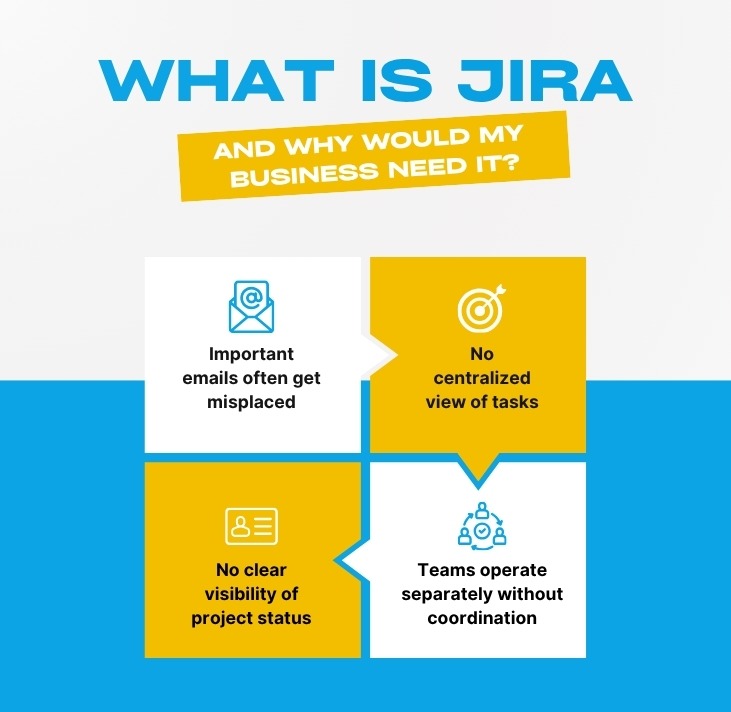
What is Jira, and why would my business need it?
Jira is a project tracking tool originally designed for software developers, but it is now highly customisable and used across marketing, HR, legal, real estate, telecommunications, and other departments where task management is required.
You need Jira when:
• Emails with tasks get misplaced
• You lack a single view of ongoing work
• Teams operate in silos without collaboration
• You are asked, “Where is that project?” and cannot answer quickly
Jira becomes your single source of truth, eliminating confusion like “I thought you were handling that.”
Can Jira work for non-tech teams like telecom or real estate?
Absolutely. Jira can be tailored for non-technical teams such as telecom marketing teams, estate agencies, law firms, and house builders. The key is configuring it with relevant issue types like “Property Listing,” “Campaign Approval,” or “Contract Review” instead of technical terms like “Bug” or “Story.”
Telecom companies use Jira for managing network issues, customer complaints, and marketing workflows. Real estate firms use it for property viewings, document approvals, and lead follow-ups.
Jira is suitable for any team that needs structured work tracking.
What is the difference between Jira Software, Jira Work Management, and Jira Service Management?
Jira Software – Best for agile development teams (Bugs, Stories, Sprints).
Jira Work Management – Designed for business teams (tasks, lists, calendars, forms).
Jira Service Management – Built for service desks (IT, HR, facilities) with SLAs and queues.
Most organisations use Jira Work Management or a combination. Choosing the right version ensures smoother adoption and better results.
Section 2: What Does Code‑Desk Actually Provide?
What Jira services do you offer?
Code-Desk provides end-to-end Jira solutions, not just advice. Our services include:
• Jira configuration from scratch – issue types, workflows, permissions, screens
• Fixing broken Jira setups – cleaning excess issue types, correcting field contexts, simplifying workflows
• Creating custom issue types – tailored for telecom, real estate, legal, ecommerce, or any industry
• Workflow automation – automatic issue movement, notifications, and field updates
• Jira training – live sessions, recorded videos, and cheat sheets
• Ongoing Jira support – monthly health checks, tweaks, and user support
We do not sell Jira licences. We ensure your Jira works the way your business operates.
Do you only work with large enterprises?
No. We work with small businesses, startups, digital marketing agencies, real estate firms, telecom suppliers, and law firms. Our smallest client had three people, while our largest had over 500.
Pricing is fixed and transparent. We do not charge per user or per hour for consulting—only for the agreed scope of work.
Can you help if we already use Jira but it is a mess?
Yes, this is one of our most common requests. A typical “mess” includes:
• 20+ issue types with no clear usage
• Custom fields appearing on incorrect issue types (e.g. wrong field context configurations)
• Workflows that allow skipping critical steps
• Loose permissions where users can delete or modify anything
We conduct a full Jira configuration audit, provide a clear report, and fix issues in a controlled manner without disrupting your live operations.
Section 3: Why Is Code Desk the Best Choice?
What makes Code Desk different from other Jira consultants?
Three things:
• We speak business, not just tech we understand how your team works and configure Jira accordingly
• Fixed pricing no hourly billing, no hidden costs, just clear upfront quotes
• Knowledge transfer training, documentation, and a Jira playbook so your team stays in control
We are also fast. Most configuration projects are completed within 3–5 days, with visible progress every 24 hours.
Do you have experience in my industry?
Yes, we have worked across multiple industries, including:
• Telecom – network incident tracking, campaign workflows, customer complaint management
• Real estate – property listing approvals, lead tracking, document management
• Ecommerce – product launches, bug tracking, content calendars
• Legal – case management, document reviews, client portals
• Estate agents – viewing schedules, offer tracking, compliance approvals
If your workflow is unique, we adapt. Jira is flexible, and we ensure it fits your business.
Can you help with Jira automation and custom development?
Yes. We handle both no-code automation using Jira’s built-in rules and custom development such as scripts, webhooks, and integrations.
Common examples include:
• Automatically assigning issues based on type or component
• Sending Slack notifications for high-priority issues
• Syncing Jira with Google Sheets or CRM systems
We always start with the simplest solution and only move to custom development when necessary.
Section 4: Jira Configuration & Issue Types – Deep Dive
What is an issue in Jira?
An issue is simply a work item such as a task, bug, request, or approval. Every issue includes a summary, description, assignee, status, and priority.
Think of it as a digital to-do item that can be moved across a board, commented on, attached to files, and tracked through reports.
What are Jira issue types? And what are the best practices?
Issue types categorise work (e.g. Bug, Task, Story, Epic, Sub-task).
Best practices:
• Use no more than 5–7 issue types per project
• Avoid “Bug” unless you track real software bugs
• Create custom types only when workflows or fields differ
• Use sub-tasks only when work depends on a parent
Simplicity is key. Too many issue types lead to confusion.
How do I create a new issue type in Jira?
Steps:
• Go to Settings → Issues → Issue Types
• Click “Add issue type”
• Add name, description, and icon
• Add it to an issue type scheme
• Assign the scheme to projects
Warning: Changing schemes later can affect existing issues. Always test first.
What does “changing issue type in Jira” mean, and is it risky?
It means converting one issue type into another (e.g. Task → Bug). Some field data may be lost if not shared between types.
Safe for small changes. For bulk updates, use automation or scripts.
What are the standard fields in a Jira bug ticket?
• Summary
• Description (steps, expected vs actual)
• Priority
• Environment
• Affects version(s)
• Assignee
• Reporter
Custom fields can be added, but avoid excessive complexity.
What does “Jira custom field context empty issue types means all” mean?
If issue types are left empty in a field context, Jira applies that field to all issue types.
This can cause irrelevant fields to appear everywhere, so configuration must be managed carefully.
Can different projects have different issue types?
Yes. Using issue type schemes, each project can have its own structure (e.g. development vs marketing).
When should I use a sub-task?
Use sub-tasks when work depends on a parent task. Avoid using them for independent work.
How does Jira configuration affect my reports?
Configuration directly impacts reporting accuracy. Incorrect issue types, workflows, or structures lead to misleading insights and poor decision-making.
What are the most common Jira configuration mistakes?
• Too many issue types
• Missing required fields
• Skippable workflows
• Weak permissions
• Poor field context management
Can you help with telecom or real estate specific Jira setups?
Yes.
Telecom:
• Network incidents
• Customer complaints (SLAs)
• Marketing workflows
Real estate:
• Property approvals
• Lead tracking
• Compliance documentation
Jira is flexible. We tailor it to your industry.
Section 5: Getting Started with Code‑Desk
How do I start a Jira configuration project with you?
Simple and no pressure:
• Book a free 30-minute discovery call (video or phone)
• We understand your setup, challenges, and goals
• You receive a fixed-price proposal and timeline
• Once approved, we begin with visible progress within 48 hours
• We configure, test, train your team, and hand over
No long-term contracts or hidden fees.
How much does Jira configuration cost?
Our fixed pricing (plus VAT where applicable):
• Jira configuration audit – from £450
• Issue type & workflow setup (one project) – from £950
• Full Jira rebuild (multiple projects, automation) – from £3,500
• Custom development – priced per requirement
• Training (up to 10 people) – from £500 (half-day)
Pricing is always shared upfront.
Can my own IT team do this instead?
Yes, but common challenges include:
• Over-engineering workflows that are too complex
• Under-engineering with poor structure
• Missing configuration side-effects that impact reporting
A dedicated Jira consultant ensures efficiency and also trains your team for long-term independence.
How do I contact Code-Desk?
Email: hello@code-desk.com (reply within one business day)
Phone: +44 (0)20 1234 5678 (Mon–Fri, 9am–5pm)
Contact form: Available on this page
Mention “Jira FAQ blog” to receive a free Jira Issue Types Best Practices PDF.
Final words from Code Desk
Jira is a powerful tool but only when it is set up to work your way, not the way a developer thought five years ago. The questions above cover 95% of what we hear from confused teams. If your question is not here, just ask.You do not have to fight your project management tool. Let us fix it for you.


