
A suspended Google Business Profile, previously known as a GMB, can instantly stop your business from gaining any more visibility. Are you a service-based business, an estate agent, or a digital marketing agency? A suspended profile means a loss of visitors and leads for your business.
As a business, especially in today’s highly competitive online world, your Google Business Profile is a primary point of contact for your business and your potential customers. When your profile gets suspended, not only does this affect your local SEO rankings, but this also affects your entire business. Many businesses, especially those offering digital marketing services for estate agents or even online marketing for real estate, need this visibility to attract customers.
The good news, however, is that a suspended profile can be recovered. With a proper strategy and a proper understanding of the entire situation, you can recover your profile efficiently. However, this requires a proper approach. A wrong step can result in a delayed or even permanent removal of your profile.
To start the recovery of your suspended profile, it is important to understand that this requires a proper and systematic approach. A random approach may not yield the desired results.
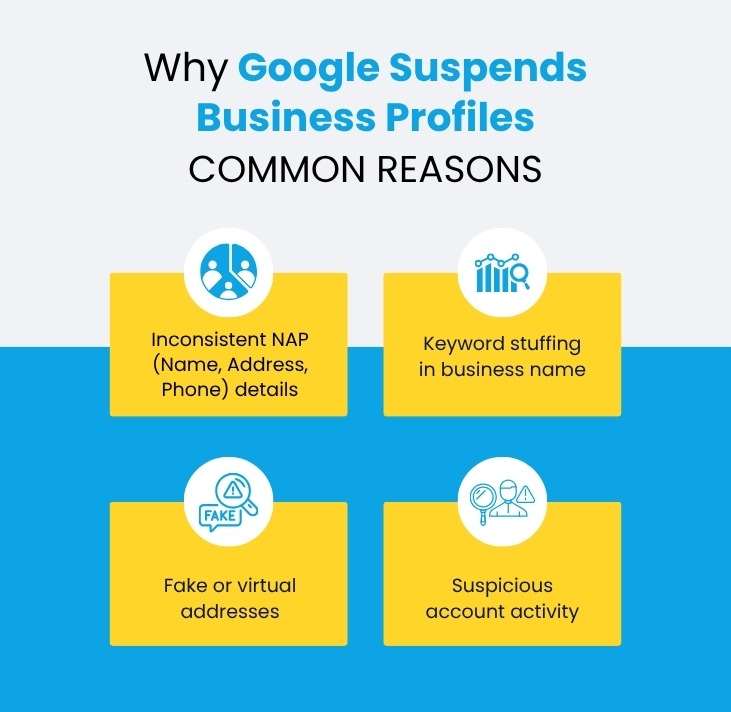
Why Google Suspends Business Profiles
Google’s priority is to maintain a trustworthy ecosystem for users. Any business that violates its guidelines intentionally or unintentionally can face suspension.
Common reasons include:
- ● Inconsistent NAP (Name, Address, Phone) details
- ● Keyword stuffing in business name
- ● Fake or virtual addresses
- ● Duplicate listings
- ● Suspicious account activity
Step 1: Identify the Root Cause of Suspension
The first step is diagnosis. Without diagnosis of the problem, the chances of success in the recovery process are zero. Many businesses rush to make their appeals without fully understanding the cause of the suspension, which often results in failure. Google’s system is sensitive to errors and violations, especially in competitive markets. It is essential to take your time and carefully analyze your profile to avoid making similar mistakes repeatedly.
Check for:
- ● Business name violations (keyword stuffing)
- ● Address issues (virtual/shared offices)
- ● Duplicate listings
- ● Website inconsistencies
Step 2: Fix All Guideline Violations
After the problem is identified, the next step is to address all violations thoroughly. It is important to note that partial corrections or hasty corrections may lower your chances of approval. It is essential to note that Google requires total compliance before considering your request for reinstatement. This is also an essential aspect of the process, as businesses offering the best small business SEO services often ignore minor details that cause suspension in the first place. Accuracy in this step is crucial in boosting your success rate.
Key areas to fix:
- ● Use your real business name only
- ● Remove unnecessary keywords
- ● Ensure accurate address and contact details
- ● Align website and listing information
Step 3: Gather Proof of Business Legitimacy
After fixing errors, you must demonstrate that your business is legitimate. Google requires verifiable proof to ensure authenticity and prevent spam listings. This step is crucial, especially for service-based businesses operating in competitive niches. Proper documentation builds trust and strengthens your appeal. Without solid evidence, even a correctly fixed profile may not be reinstated. Businesses in seo services for the real estate industry must be particularly careful due to stricter scrutiny.
Prepare these documents:
- 1 Business registration certificate
- 2 Utility bills
- 3 Tax documents
- 4 Office photos (interior & exterior)
Step 4: Submit a Reinstatement Request
Once all of these corrections and documentation are done, you can now proceed with your request for reinstatement. This is the most critical part of the whole process of recovery. It is essential to explain in your request what happened and how you fixed the problems. It is best not to be vague or emotional in your explanations; be factual and clear.
Process:
- ● Fill out the reinstatement form
- ● Upload supporting documents
- ● Provide a clear explanation
Step 5: Monitor Your Email and Respond Quickly
After submission, communication becomes essential. Google may contact you for additional verification or clarification. Delayed responses can slow down the entire process. Staying proactive ensures that your case progresses smoothly. Businesses that respond quickly often experience faster reinstatement. This step requires patience and consistency while waiting for Google’s review.
Best practices:
- ● Check email daily
- ● Respond within 24–48 hours
- ● Provide accurate additional information
Step 6: Avoid Making Frequent Changes
During the review period, it’s important to maintain stability in your profile. Making frequent edits can trigger additional verification checks or reset your application. Many businesses unintentionally delay their recovery by constantly updating details. Google prefers consistency while reviewing reinstatement requests. If your profile is already corrected, avoid unnecessary changes. This is particularly important for agencies offering complete seo service, where frequent updates are common.
Avoid:
- ●Editing business details repeatedly
- ●Changing address or category
- ●Creating duplicate listings
Step 7: Optimize Your Profile After Reinstatement
After your profile is reinstated, your attention should be focused on optimizing your profile. Remember that recovery is just the beginning; getting your rankings back is another process. An optimized profile will increase your visibility and conversions. For businesses in competitive niches such as digital marketing agencies for ecommerce sites, it is important to keep your profiles updated. Optimizing your profile will also prevent future suspensions.
Optimization steps:
- ●Add high-quality images
- ●Update business information
- ●Encourage customer reviews
- ●Post regular updates
How Long Does It Take to Recover a Suspended Profile?
Recovery timelines vary depending on the severity of the issue:
- ● 3–7 days for minor issues
- ● 2–4 weeks for complex cases
- ● Longer for multiple violations
Patience and accuracy are key to success.
Common Mistakes to Avoid
Many businesses fail to recover due to avoidable errors:
- ● Submitting incomplete documents
- ●Ignoring Google guidelines
- ● Creating new listings instead of fixing the old one
- ● Using fake addresses
How to Prevent Future Suspensions
To avoid future issues, follow these best practices:
- ● Keep NAP details consistent
- ● Avoid keyword stuffing
- ● Use a real business address
- ● Maintain regular activity
- ● Follow Google guidelines strictly
Businesses offering real estate online marketing services must ensure high accuracy to maintain trust.
Final Thoughts
While it might seem daunting to recover a suspended Google Business Profile, it is entirely doable with the right strategy in place. With these 7 steps, you can easily pinpoint the problem, resolve the violations, and recover your listing successfully.Consistency, accuracy, and compliance are the keys to success in the long term. After recovering your profile, you should now work on optimization and maintenance to ensure continued success and growth.


