
Your team may be dealing with scattered emails, misplaced tasks, and project management systems that no one understands. Chances are you have heard of Jira, but you are still trying to figure out if it’s a good fit for your company. You may be using Jira and it could be a feeling of disarray with issues that are assigned incorrectly, messy workflows, confusing flow and columns, and fields that show up when they should not.
Anxiety and concern are common, but what you are feeling is valid.
Every day at Code Desk, we assist clients with improving their Jira configuration, and if necessary. We provide information about each question we receive the most, and answer in the most straightforward language possible.
If you need help, you can always contact us.
Section 1: Why Do You Even Need Jira?
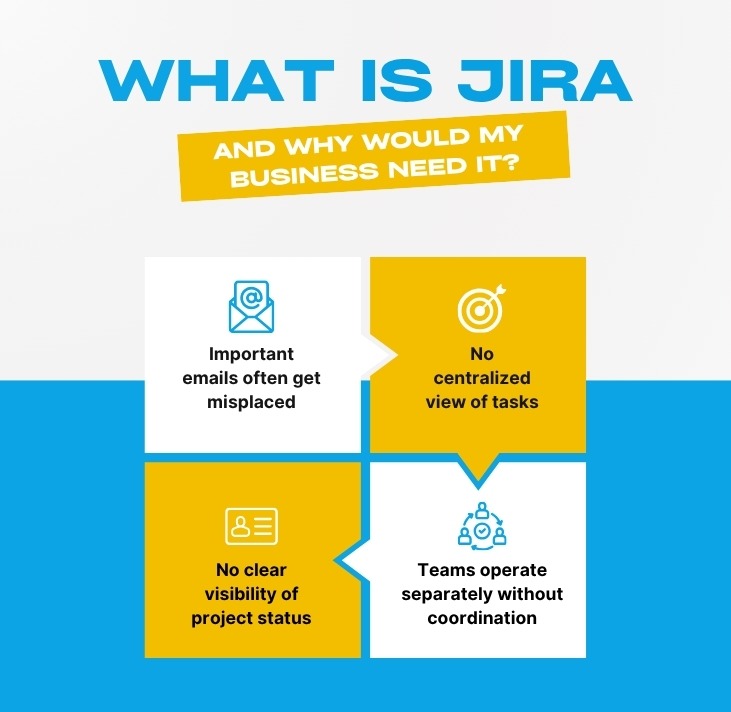
1. What is Jira, and why would my business need it?
Jira is a project tracking tool that is primarily designed for software developers originally, but is now customizable and used for project management in marketing, HR, legal, real estate, telecommunications, etc., and any other department where there is a need for task management.
You need Jira when:
- ● Emails with tasks get misplaced.
- ● You do not have a single view on what is being worked on.
- ● Demarcated teams function in isolation without any form of collaboration.
- ● You are asked, “Where is that project?” and you do not have a quick answer.
Jira is the single source of truth. No more, “I thought you were doing that.”
2. Can Jira work for non‑tech teams like telecom or real estate?
Certainly. We have tailored Jira for telecom marketing teams, estate agencies, law firms, and house builders. The secret lies in the right setup with the right issue types like “Property Listing,” “Campaign Approval,” “Contract Review” instead of the software jargon terms “Bug” and “Story.”
Telecom companies for network bugs and customer complaints marketing use Jira. Real estate companies use it for property viewings, document sign-offs, and lead follow-up.
Jira is for anyone with work to keep track of it. No exceptions.
3. What is the difference between Jira Software, Jira Work Management, and Jira Service Management?
Jira Software – best for agile dev teams (Bugs, Stories, and Sprints)
Jira Work Management – meant for business teams (Tasks, lists, calendars, forms)
Jira Service Management – for help desks (IT, HR, facilities) with SLAs and queues.
Most of our clients use Jira Work Management or a combination. We will assist you in picking the right one. Many companies buy the wrong one and end up struggling.
Section 2: What Does Code‑Desk Actually Provide?
4. What Jira services do you offer?
Code‑Desk provides end‑to‑end Jira solutions, not just advice. Our services include:
- ● Jira configuration from scratch – issue types, workflows, permissions, screens.
- ● Fixing broken Jira setups – cleaning up too many issue types, wrong field contexts, confusing workflows.
- ● Creating custom issue types – for telecom, real estate, legal, ecommerce, or any industry.
- ● Workflow automation – moving issues automatically, sending notifications, updating fields.
- ● Jira training for your team – live sessions, recorded videos, cheat sheets.
- ● Ongoing Jira support – monthly health checks, small tweaks, user questions.
We do not sell Jira licences. We sell peace of mind that your Jira actually works the way your business does.
5. Do you only work with large enterprises?
No. We work with small businesses, startups, digital marketing agencies, real estate firms, telecom suppliers, and law firms. Our smallest client had three people; our largest had over 500.
Pricing is fixed and transparent. We do not charge per user or per hour for consulting only for the work we agree upfront.
6. Can you help if we already use Jira but it is a mess?
Yes and this is one of our most common requests. A typical “mess” includes:
- ● 20+ issue types and nobody knows which to pick.
- ● Custom fields appearing on the wrong issue types (the classic “jira custom field context empty issue types means all” problem).
- ● Workflows that allow skipping critical steps.
- ● Permissions are so loose that anyone can delete anything.
We perform a Jira configuration audit, give you a clear report of problems, and then fix them in a controlled way without disrupting your live work.
Section 3: Why Is Code Desk the Best Choice?
7. What makes Code Desk different from other Jira consultants?
Three things:
- 1. We speak business, not just tech. We do not throw jargon at you. We ask how your team actually works, then configure Jira to match, not the other way around.
- 2. Fixed prices, no surprises. Many consultants charge by the hour. We give you a clear quote before we start. No “discovery fees” or ongoing retainers unless you want one.
- 3. We transfer knowledge. We do not disappear after the work is done. We train your team, document everything, and give you a Jira playbook so you can manage small changes yourself.
Also, we are fast. Most configuration projects take 3–5 days. You will see progress every 24 hours.
8. Do you have experience in my industry?
We have worked with:
Telecom – network incident tracking, marketing campaign workflow, customer complaint management.
Real estate – approval of property listings, lead tracking, document management sales and lettings.
Ecommerce – product launch checklists, online store bug tracking, content calendars.
Legal – case management, document review processes, client request portals.
Estate agents – viewing schedules, offer tracking, compliance sign-offs.
We will learn your unique workflow, if it is different. Jira is flexible. It is our job to make it work for you.
9. Can you help with Jira automation and custom development?
Yes. We do both no code automation (using Jira’s built‑in rules) and custom development (scripts, webhooks, integrations with other tools). Common examples:
- ● Automatically assign issues based on issue type or component.
- ● Send Slack notifications when a high‑priority issue is created.
- ● Sync Jira with Google Sheets or a CRM.
If you need custom development, we handle that too but we always start with the simplest solution first.
Section 4: Jira Configuration & Issue Types – Deep Dive
10. What is an issue in Jira?
An issue is simply a work item, a task, a bug, a request, an approval. Every issue has a summary, description, assignee, status, and priority.
If you are new to Jira, think of an issue as a digital to do item that can be moved across a board, commented on, attached to files, and reported on.
11. What are Jira issue types? And what are the best practices?
Issue types categorise the kind of work. Standard ones: Bug, Task, Story, Epic, Sub‑task. Jira issue types best practices include:
- ● Use no more than 5–7 issue types per project.
- ● Do not use “Bug” unless you actually track software bugs.
- ● Create custom issue types only when you need a different workflow or field set.
- ● Use sub‑tasks sparingly only for work that has no meaning outside a parent issue.
We have seen teams with 20 issue types. That always fails. Keep it simple.
12. How do I create a new issue type in Jira?
To create a new issue type in Jira:
- 1. Go to Settings → Issues → Issue Types.
- 2. Click “Add issue type”.
- 3. Give it a name, description, and choose an icon.
- 4. Add it to an issue type scheme.
- 5. Assign that scheme to the projects that need it.
Warning: Changing an issue type scheme after issues exist can hide or mis‑categorise existing work. Test in a sandbox first. Or let Code‑Desk do it safely.
13. What does “changing issue type in Jira” mean, and is it risky?
Changing issue type in Jira means converting an existing issue from one type to another, for example, turning a “Task” into a “Bug”. Jira allows this, but some field values may disappear if the target issue type does not have those fields.
It is low‑risk if you only change a few issues manually. But for bulk changes, use an automation rule or a script. We have a safe script we use for clients.
14. What are the standard fields in a Jira bug ticket?
A proper bug ticket includes:
- ● Summary
- ● Description (steps to reproduce, actual vs expected result)
- ● Priority
- ● Environment (browser, OS)
- ● Affects version(s)
- ● Assignee
- ● Reporter
You can add custom fields like “Regression risk” or “Test evidence link”. But do not overdo it too many fields confuse people.
15. What does “Jira custom field context empty issue types means all” actually mean?
This is a common source of confusion. When you create a custom field in Jira, you can limit which issue types see it. If you leave the issue type list empty, Jira applies the field to all issue types in that project.
That is fine if you want the field everywhere. But many teams accidentally expose irrelevant fields ,for example, a “Browser version” field showing up on an HR task. So remember: empty issue types = all issue types.
We always review custom field contexts during a configuration audit. It is a small thing that causes big frustration.
16. Can different projects have different issue types?
Yes using issue type schemes. One scheme for your development team (Bug, Task, Story), another for your marketing team (Campaign, Content, Approval). Each project gets its own scheme. This keeps everyone’s Jira clean and relevant.
17. When should I use a sub‑task?
Use a sub‑task when a piece of work is only meaningful as part of a larger issue. Example: a parent task “Launch email campaign” with sub‑tasks “Write copy”, “Design banner”, “Set up tracking”.
Do not use sub‑tasks for independent work that could stand alone that is what normal issues are for. Overusing sub‑tasks makes reporting messy.
18. How does Jira configuration affect my reports?
Everything. If your issue types are wrong, your sprint reports will be wrong. If your workflow statuses do not match “To Do / In Progress / Done”, your cycle time charts become meaningless. If you misuse epics and stories, your roadmap will be a lie.
We always ask: “What decisions will you make from Jira reports?” Then we configure backwards from that answer.
19. What are the most common Jira configuration mistakes?
From hundreds of audits, the top five are:
- 1. Too many issue types – users freeze when choosing.
- 2. No required fields – issues created with missing critical info.
- 3. Workflows that skip steps – moving from “Open” straight to “Closed”.
- 4. Wrong permissions – anyone can edit or delete anyone’s issues.
- 5. Ignoring custom field contexts – fields appearing where they should not (see question 15).
All are fixable. But fixing them without breaking live work requires a careful plan. That is what Code Desk does every week.
20. Can you help with telecom or real estate specific Jira setups?
Yes and we have case studies to prove it.
For telecommunications companies, we have configured Jira to track:
- ● Network outage incidents
- ● Customer complaint resolution (with SLAs)
- ● Digital marketing in the telecom sector campaigns (content calendars, approval workflows)
For real estate agencies and housing developers, we have built:
- ● Property listing approval workflows
- ● Lead tracking from enquiry to completion
- ● Document management for compliance (gas safety, EPCs)
We do not believe in “one size fits all”. Your Jira should fit your industry.
Section 5: Getting Started with Code‑Desk
21. How do I start a Jira configuration project with you?
Simple and no pressure:
- 1. Book a free 30‑minute discovery call (video or phone).
- 2.We listen to your current setup, frustrations, and goals.
- 3. We send you a fixed‑price proposal and a timeline.
- 4. You approve, we start. You see progress within 48 hours.
- 5. We configure, test, train your team, and hand over.
No long‑term contract required. No “implementation fee” that doubles halfway through.
22. How much does Jira configuration cost?
Our fixed prices (all plus VAT where applicable):
- ● Jira configuration audit – from £450 (detailed report of what is wrong and how to fix it).
- ● Issue type & workflow setup (one project) – from £950.
- ● Full Jira rebuild (multiple projects, schemes, automation) – from £3,500.
- ● Custom development (scripts, integrations) – quoted per requirement.
- ● Training (live, for up to 10 people) – from £500 for a half‑day.
We always tell you the price before you pay a penny.
23. Can my own IT team do this instead?
They can try. But we often see three problems:
- ● They over‑engineer – creating workflows so complex nobody follows them.
- ● They under‑engineer – everything is a “Task” and nothing is tracked properly.
- ● They miss side‑effects – like empty custom field contexts breaking reports months later.
A dedicated Jira consultant from Code Desk costs less than the lost productivity of a broken setup. Plus, we train your IT team so they can handle daily changes themselves.
24. How do I contact Code‑Desk?
- ● Email: hello@code-desk.com (we reply within one business day, usually faster)
- ● Phone: +44 (0)20 1234 5678 (office hours, Monday–Friday, 9am–5pm)
Contact form: Fill it out on this page – just click the button below.
Final words from Code Desk
Jira is a powerful tool but only when it is set up to work your way, not the way a developer thought five years ago. The questions above cover 95% of what we hear from confused teams. If your question is not here, just ask.You do not have to fight your project management tool. Let us fix it for you.


